How to Spot and Avoid Phishing Emails
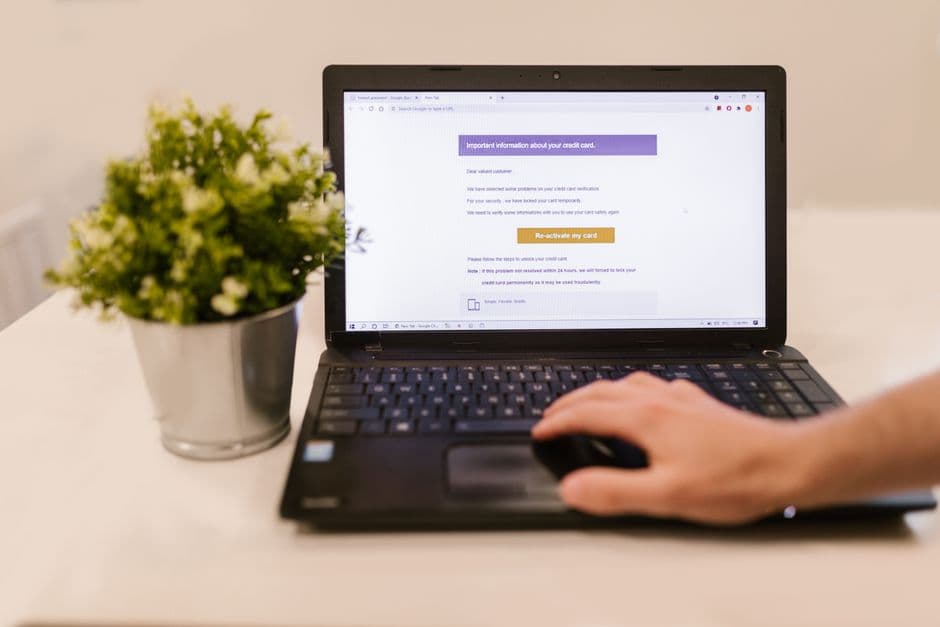
Phishing emails are deceptive messages designed to steal personal information or infect your device with malware. Recognizing and avoiding these scams is crucial for protecting your accounts and sensitive data. This guide offers practical methods for identifying phishing attempts and tips for safeguarding your online presence.
📣 Здесь может быть ваша рекламаОставить заявку →1Method 1: Recognizing Phishing Emails
- 1
Check the sender's email address
The first step is to scrutinize the sender's email address. Cybercriminals often use addresses that resemble legitimate ones but may contain slight alterations or misspellings. Look for formatting discrepancies, like unusual domains (e.g., '@yahoo.co' instead of '@yahoo.com'). Make sure to verify this before clicking on any links or downloading attachments. - 2
Examine the content
Phishing emails commonly use urgent language or threats to provoke quick action. Read through the message for awkward phrasing, spelling mistakes, or grammatical errors. Legitimate companies maintain a professional tone, while phishing messages often seem unpolished. Highlight any striking cues, such as informal language or suspicious requests for personal details. - 3
Look for personalized greetings
When businesses communicate with you, they usually use your name. Phishing emails often start with generic greetings like 'Dear Customer' or 'Dear User.' If the email lacks personal touches or seems impersonal, it is a red flag. Legitimate organizations generally tailor their messages to establish trust. - 📣 Здесь может быть ваша рекламаОставить заявку →4
Check for links
Inspect any hyperlinks before clicking. Hover your mouse over the link to see the actual URL on the status bar. Phishing emails often disguise malicious links with legitimate-looking text. Verify if the domain aligns with the sender's supposed organization (e.g., 'bankname.com'). If in doubt, don't click, and rather visit the website directly through your browser. - 5
Detect attachments
Be cautious with attachments, especially if they seem out of context or unexpected. Malicious files may carry harmful software. If the email prompts you to download something from an unknown sender, it’s typically best to avoid it entirely. Legitimate institutions usually don’t send sensitive documents as attachments without prior communication.
2Method 2: Verifying Email Authenticity
- 1
Double-check URLs
If the email contains links, double-check the URLs they lead to. Open your internet browser and type out the URL manually instead of clicking the link. This reduces the risk of landing on a phishing site. Be extra cautious of similar-looking domains or subtle misspellings. - 2
Contact the organization
If unsure about the legitimacy of the email, reach out to the organization directly using a trusted method such as their official website or phone number. Do not use contact details provided in the suspicious email, as they could mislead you. Genuine representatives can confirm whether they sent the email in question. - 📣 Здесь может быть ваша рекламаОставить заявку →3
Use email authentication tools
Consider using email authentication tools like SPF (Sender Policy Framework), DKIM (DomainKeys Identified Mail), and DMARC (Domain-based Message Authentication, Reporting & Conformance). These tools help ensure emails are legitimate. If your email service provider supports these protocols, enable them for better protection against phishing. - 4
Check email headers
For a more technical verification, analyze the email headers. Email headers contain routing information and can reveal the sender's IP address and whether the email is legitimate. Look for inconsistencies between the sender's IP address and the domain. If this seems complex, there are online guides or tools that can simplify the process. - 5
Look for signs of spoofing
Spoofing occurs when a phishing email mimics a legitimate sender. Check for consistency between the sender's name and address. Additionally, if you notice multiple email addresses in the 'reply-to' section, this may indicate a phishing attempt. Spoofers often try to create a sense of urgency while appropriately masking true identity.
3Method 3: Protecting Yourself Against Phishing
- 1
Update security software
Ensure your anti-virus and anti-malware software is current and running. Regular updates can protect your devices from evolving phishing tactics. Schedule scans at least weekly to identify potential threats proactively, keeping your system fortified against malicious activity. - 📣 Здесь может быть ваша рекламаОставить заявку →2
Enable two-factor authentication
Two-factor authentication (2FA) adds an extra protective layer to your accounts. This requires a second piece of information, like a code sent to your mobile device, in addition to your password. Enabling 2FA makes it significantly harder for attackers to access your accounts even if they manage to get your login details. - 3
Educate yourself and others
Stay informed about the latest phishing trends. Be proactive in educating friends, family, and colleagues about potential phishing attempts. Share articles or resources about new phishing techniques in your circles to foster a community that's aware and vigilant. This can create a ripple effect that helps others stay safe. - 4
Use a password manager
Utilizing a password manager can help you create and store complex passwords that are difficult to guess. It also fills in passwords automatically and can warn you of phishing attempts when accessing sites. Choose a reputable password manager for secure storage and better account protection. - 5
Be cautious on social media
Avoid sharing too much personal information on social media. Cybercriminals often gather data from your profiles to craft more convincing phishing attempts. Adjust your privacy settings to limit who can view your posts and think critically before posting personal details that could be exploited.
💡 Tips
- Always use strong, unique passwords for your accounts.
- Regularly update your devices and software.
- If an email looks suspicious, it's safer to delete it without opening.
- Consider email filtering options to mark spam or phishing attempts.
⚠️ Warnings
- Never provide sensitive information through email unless you are absolutely sure about the recipient's identity.
- Be wary of emails claiming urgent action is required; this is a common tactic used by phishers.
- If you receive unexpected emails from known contacts, verify their authenticity with the contact directly.
Frequently asked questions
What is phishing?
Phishing is a fraudulent attempt to obtain sensitive information such as usernames, passwords, and credit card details by disguising as a trustworthy entity in electronic communications.
How can I report a phishing email?
To report a phishing email, forward it to the Federal Trade Commission (FTC) at reportphishing@apwg.org, or if it’s from a specific service provider, send it to their reported phishing address, often listed on their website.
Are phishing emails only found in my inbox?
No, phishing attempts can also occur through text messages (SMS), social media, and phone calls, known as vishing or smishing, where attackers try similar deception tactics.
What should I do if I clicked on a phishing link?
If you suspect you've clicked a phishing link, immediately change your passwords for any accounts that might be compromised, run a security scan on your device, and monitor your accounts for suspicious activity.
Can I recover from a phishing attack?
Recovery is possible but can vary in difficulty based on the data accessed or stolen. Act quickly by changing passwords and contacting your financial institutions for support.